Guide
Turn a Google Sheets row into a PDF invoice
| Row | client | invoice_no | +8 more |
|---|---|---|---|
| 2 | Harbour Dental Group | 2026-0042 | … |
PDFops builds the invoice
/api/invoice, once per row. Done by the Zapier template below.
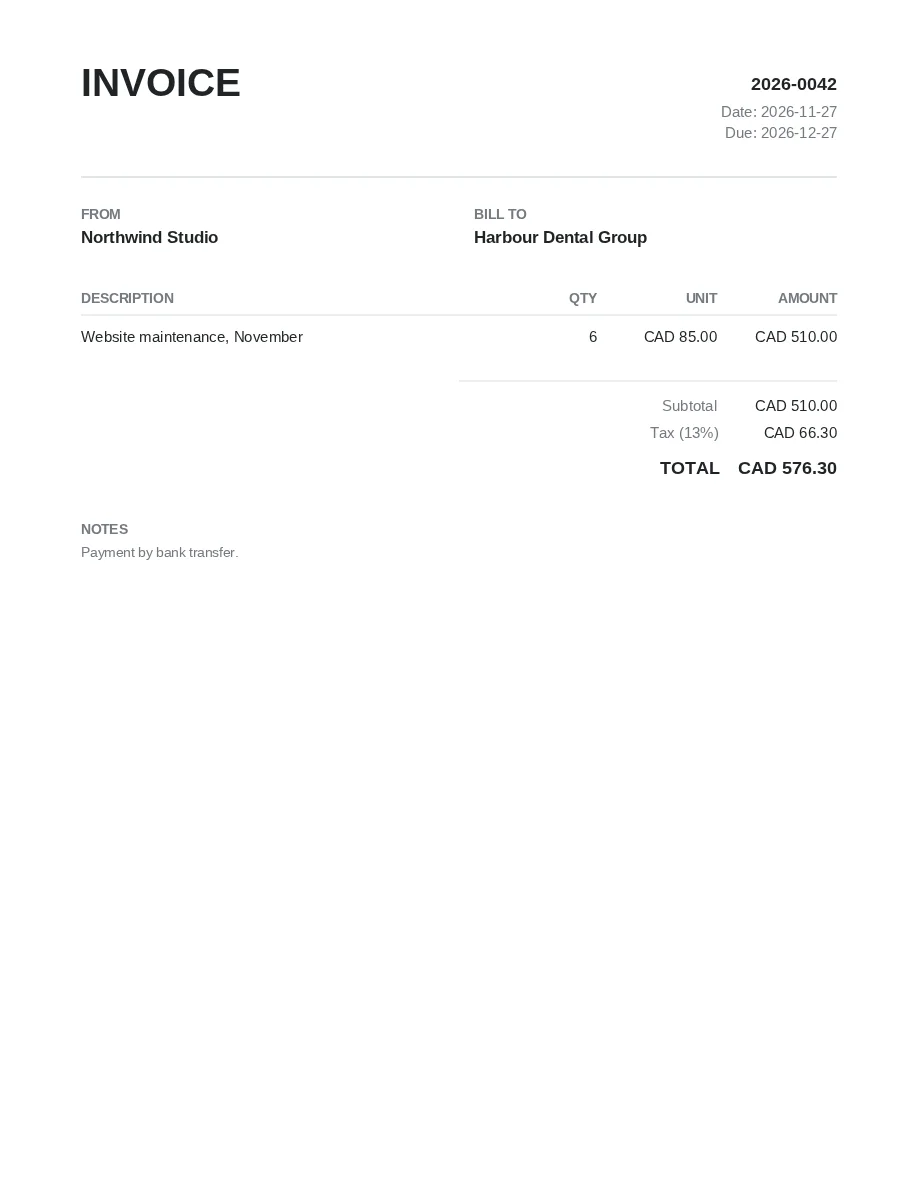
Plenty of small businesses keep their billing in a Google Sheet and still type each invoice out by hand. PDFops draws a complete invoice from structured data, with no template to prepare, so a sheet row can become the invoice directly. This page shows the Zapier template that already exists, the column mapping, and the cell values that make the invoice step fail.
What you get
Add a row to a billing sheet and get back one PDF invoice, with the row's client, line item, rate and dates laid out as a finished document. See a sample invoice PDF.
Set it up
- Set up the sheet columns. Put one header per column in row 1 and one invoice per row below it. The example uses the client, an invoice number, an invoice date, a due date, one service, hours, a rate, a currency, a tax percentage and a note. Your own name or company goes in the From field of the PDFops step, typed once, so it needs no column.
- Write the client and the dates so the invoice step takes them. An invoice needs a client name, so keep the client column filled on every row. In the Zapier action the invoice date and the due date are date fields, and the action sends only the first ten characters of each, so write both as YYYY-MM-DD, for example 2026-11-27. A due date such as On receipt of invoice would print as On receipt. Write the date columns as plain text so they reach the step in that form. Hours and rate must be plain numbers, with no currency symbol.
- Get a free key and connect PDFops. Create a free API key, then paste it into the PDFops connection in Zapier.
- Test on a scratch folder, and leave the Zap off. Open the template and pick a scratch Google Drive folder in the Upload File step: testing that step saves a real invoice to the folder you chose. Map each invoice field to its column once in the PDFops step, run the test on a row you added for the purpose, and open the PDF.
- Compare the invoice with its row. Check the invoice against the row it came from: the client, the currency, the hours times the rate, the tax and the total. Fix the mapping if any of them is off.
- Pick the real folder, then turn it on. Choose the real Google Drive folder in the Upload File step again, then turn the Zap on. From then on every row added to the sheet becomes an invoice in that folder.
Column to invoice field mapping
Each row becomes one POST call to /api/invoice (endpoint reference). In Zapier you choose the column for each invoice field once, in the PDFops step; after that every new row fills the same fields. The invoice layout is fixed, so there is no template PDF to prepare.
| Sheet column | Invoice field | Example value |
|---|---|---|
client | to | Harbour Dental Group |
invoice_no | invoice_number | 2026-0042 |
invoice_date | date | 2026-11-27 |
due_date | due | 2026-12-27 |
service | items.description | Website maintenance, November |
hours | items.quantity | 6 |
rate | items.unit_price | 85 |
currency | currency | CAD |
tax_pct | tax_rate | 13 |
notes | notes | Payment by bank transfer. |
| typed once in the PDFops step | from | Northwind Studio |
Templates
Zapier
Open the template in Zapier: Create PDFops invoice PDFs from new Google Sheets rows and save them to Google Drive. It is also on its listing page.
Steps: Google Sheets (New Spreadsheet Row), then PDFops (Create Invoice PDF), then Google Drive (Upload File).
Before you run it. Testing the Upload File step saves a real invoice to the Drive folder you picked, so choose a scratch folder first and pick the real folder again before you turn the Zap on. Leave the Zap off until the sample invoice reads right; once it is on, every row added to the sheet becomes an invoice in that folder.
Needs a paid plan. Three steps (trigger, PDFops, Google Drive). Zapier's Free plan allows two-step Zaps only (zapier.com/pricing.md, read 2026-11-27). A trigger plus the PDFops step alone would run on Free but would deliver the invoice nowhere.
Get a free PDFops key for Zapier
Frequently asked
Which columns does the sheet need?
At least a client name, a line item description and a unit price, plus your own name or company in the From field. Everything else is optional: an invoice number, an invoice date, a due date, a quantity that defaults to 1, a currency that defaults to USD, a tax percentage and a note. In Zapier you choose the column for each field in the PDFops step, so the headers can be anything.
Why does the invoice step fail on some rows?
Check two things first: the client cell is filled, and the invoice date and due date are written YYYY-MM-DD. Write the date columns as plain text in the form 2026-11-27, so every value reaches the step in the one form the Zapier action expects.
Can an invoice have more than one line item?
This guide maps one line item per row, so one row makes one invoice with one line. The invoice endpoint reference describes the full request, which takes up to 100 line items.
Does this run on a free Zapier plan?
No. The template has three steps, and Zapier's Free plan allows two-step Zaps, so it needs a paid Zapier plan. A PDFops key itself is free.
Is there an n8n workflow for this?
Not for this exact flow. n8n has an Invoice operation in the PDFops node, and the Stripe invoice guide on this site links a workflow that uses it.
Does the invoice carry a PDFops footer?
Invoices made with a free key, or with no key, carry a one-line footer saying Generated with pdfops.dev. Paid keys get clean output.
Try it
Get a free API key, then open a template above. You can also build a sample invoice in the free invoice generator first.