Guide
Fill a PDF form from Google Sheets
| Row | applicant_name | email_addr | +6 more |
|---|---|---|---|
| 2 | Maya Okafor | maya.okafor@example.com | … |
PDFops fills the form
/api/fill-form, once per row. Done by the Zapier template and the n8n workflow below.
Applicant lists, onboarding sheets and registration logs usually live in Google Sheets, and each line often needs a form filled out by hand. PDFops fills fillable PDF forms from a set of field values, so a sheet row can become those values directly. This page shows the two templates that already exist, the column mapping, and which plans each one needs.
What you get
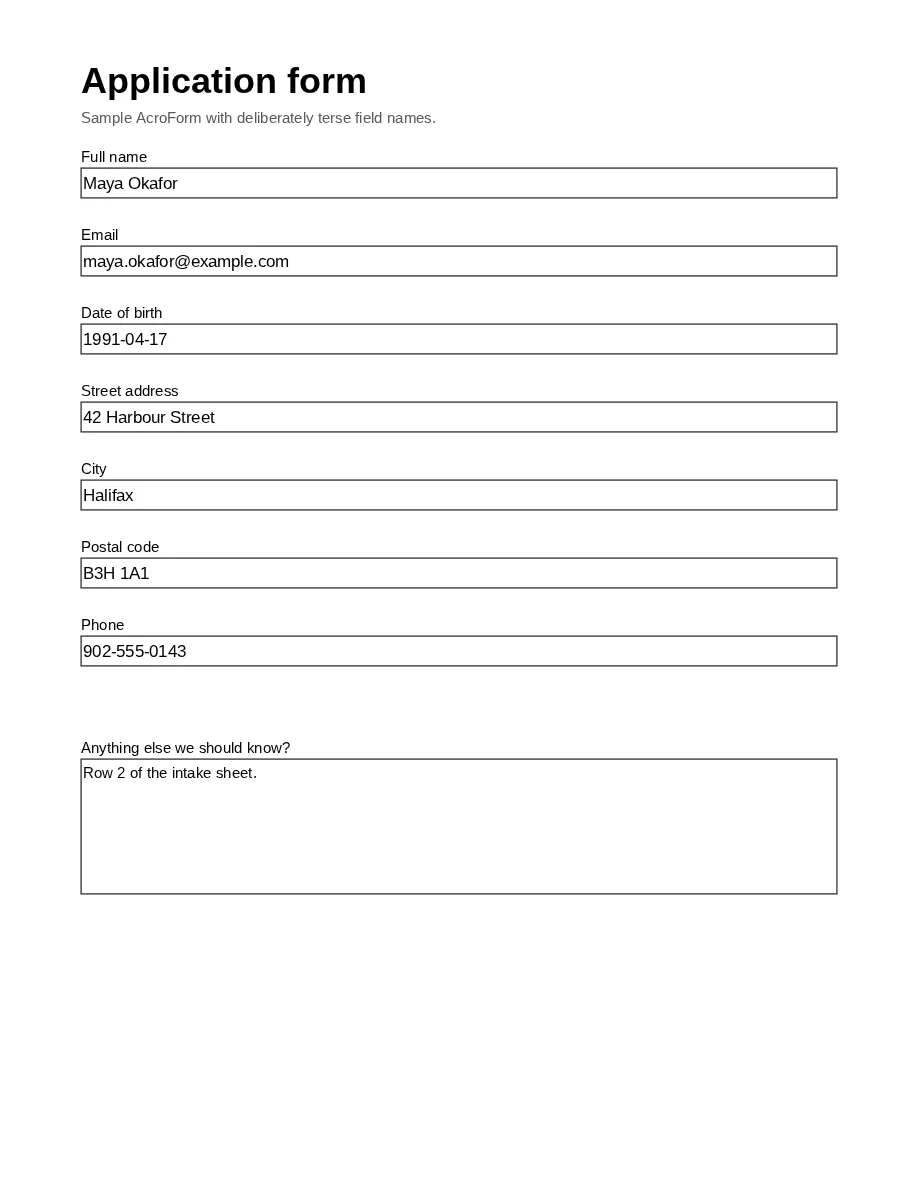
Add a row to a Google Sheet and get back one filled PDF form, with that row's values written into the form's fields. See a filled sample PDF.
Set it up
- Find the form's field names. Open the blank PDF in the free Form-Field Inspector, or run the Inspect PDF Form Fields action. Labels printed on a page often differ from the field names inside the file. The sample form prints Full name, but its field is called applicant_name.
- Set up the sheet columns. Put one header per column in row 1 and the values below. The n8n workflow reads every column by its header, so name each column after the PDF field it fills. In Zapier you pick the column for each field once, inside the action, so any headers work.
- Get a free key and connect PDFops. Create a free API key, then paste it into the PDFops connection in Zapier or the PDFops credential in n8n.
- Test on a copy of the sheet with one row. Make a copy of the sheet that holds a single row, with your own address in its email column, and point the template at the copy and at your blank PDF. In the n8n workflow, open the Set Batch Config node and change maxRowsPerRun from 50 to 1 before you run anything: every row with a blank status counts as pending, and each pending row is filled, saved to Drive and emailed to the address in its row, so a first run on a real sheet would email up to 50 people. Run it once by hand, and keep the workflow inactive until the result is right, because an active workflow runs every hour. In Zapier, testing the Dropbox step can upload a real file to the folder you chose.
Column to field mapping
Each row becomes one POST call to /api/fill-form (endpoint reference). In Zapier you choose the column for each form field once, in the PDFops step; after that every new row fills the same fields. In n8n every column is read by its header, so a column named like a form field fills that field. The example row fills the blank template PDF, and the result is flattened, so its fields are no longer interactive.
| Sheet column | PDF field | Example value |
|---|---|---|
applicant_name | applicant_name | Maya Okafor |
email_addr | email_addr | maya.okafor@example.com |
dob | dob | 1991-04-17 |
addr_line1 | addr_line1 | 42 Harbour Street |
city | city | Halifax |
postal_code | postal_code | B3H 1A1 |
phone_no | phone_no | 902-555-0143 |
notes | notes | Row 2 of the intake sheet. |
Templates
Zapier
Open the template in Zapier: Fill PDF forms in PDFops from new Google Sheets rows and upload them to Dropbox. It is also on its listing page.
Steps: Google Sheets (New Spreadsheet Row), then PDFops (Fill PDF Form), then Dropbox (Upload File).
Before you run it. Testing the Dropbox step can upload a real file to the folder you picked.
Needs a paid plan. Three steps (trigger, PDFops, Dropbox). Zapier's Free plan allows two-step Zaps only (zapier.com/pricing.md, read 2026-11-27). A trigger plus the PDFops step alone would run on Free but would deliver the PDF nowhere.
Get a free PDFops key for Zapier
n8n
Open the template on n8n: Fill PDF forms in bulk from Google Sheets with PDFops and Google Drive. Or download the workflow JSON and import it. It uses the n8n-nodes-pdfops community node.
Steps: Schedule (Schedule Hourly), then Google Sheets (Read Sheet Rows, keep rows with a blank status), then PDFops (Inspect PDF Fields once, check every column header), then PDFops (Fill Form for Row), then Google Drive (Save Filled PDF to Drive), then Gmail (Email Filled PDF), then Google Sheets (Write done or the error back to the row), then Slack (Post Run Summary).
Before you run it. Each pending row is emailed to the address in its email column, and a summary is posted to the Slack channel you set. Set maxRowsPerRun to 1 in Set Batch Config and test on a copy of the sheet first.
Can run without a paid plan. n8n has no free Cloud plan (n8n.io/pricing, read 2026-11-27). The workflow runs without a licence fee on self-hosted Community Edition with the n8n-nodes-pdfops community node installed, and with a free PDFops key.
Frequently asked
Which columns does the sheet need?
For n8n, one column for each PDF field you want filled, named exactly like the field; a header that matches no field stops the batch, so remove or rename helper columns. The n8n workflow also expects status and pdf_link columns, and an email column for the copy it sends. For Zapier you choose the column for each field in the action, so the headers can be anything.
Can I fill a PDF that has no form fields?
Not with this fill action. It writes into fillable form fields, called AcroForm fields. For a flat PDF, the Make a PDF Fillable tool on pdfops.dev can detect where fields belong and add them first.
Do these templates run on free plans?
The Zapier template has three steps, and Zapier's Free plan allows two-step Zaps, so it needs a paid Zapier plan. The n8n workflow runs on a self-hosted n8n, which has no licence fee, because n8n Cloud has no free plan. A PDFops key itself is free.
How is a checkbox or dropdown filled?
A checkbox takes the text true or false. A dropdown or radio group takes one of the field's listed options exactly. The sample form used here has text fields only.
Try it
Get a free API key, then open a template above. You can also test your own PDF in the playground first.
← PDFops home · Zapier guide · n8n guide · Free key · Pricing