Guide
A PDF API for Make
PDFops is a PDF API. You can use it in Make now: Make's built-in HTTP module has a Make a request action that calls any API, so a scenario can send a row of data to PDFops and get a finished PDF back. This guide builds two real scenarios that way, an invoice from a row of data and a filled PDF form, with screenshots and a 63-second video taken from the Make editor. We have also built a native PDFops app for Make. It is not in Make's app list yet and has no release date, so this guide does not depend on it.
What you can do
- Create an invoice PDF from sender, recipient and line items, with no template to design.
- Fill a PDF form that has fillable fields, and return the filled file.
- Merge, split, rotate and watermark PDFs, read text and tables, and make PDFs from HTML or text. Each is one HTTP call to the same API, listed in the docs.
These two files came out of the two scenarios below.
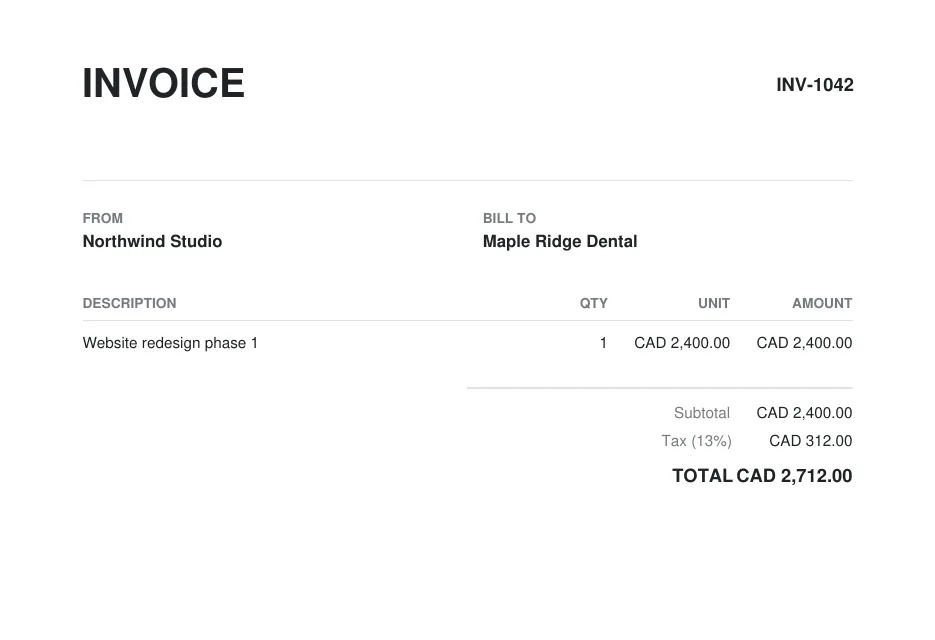
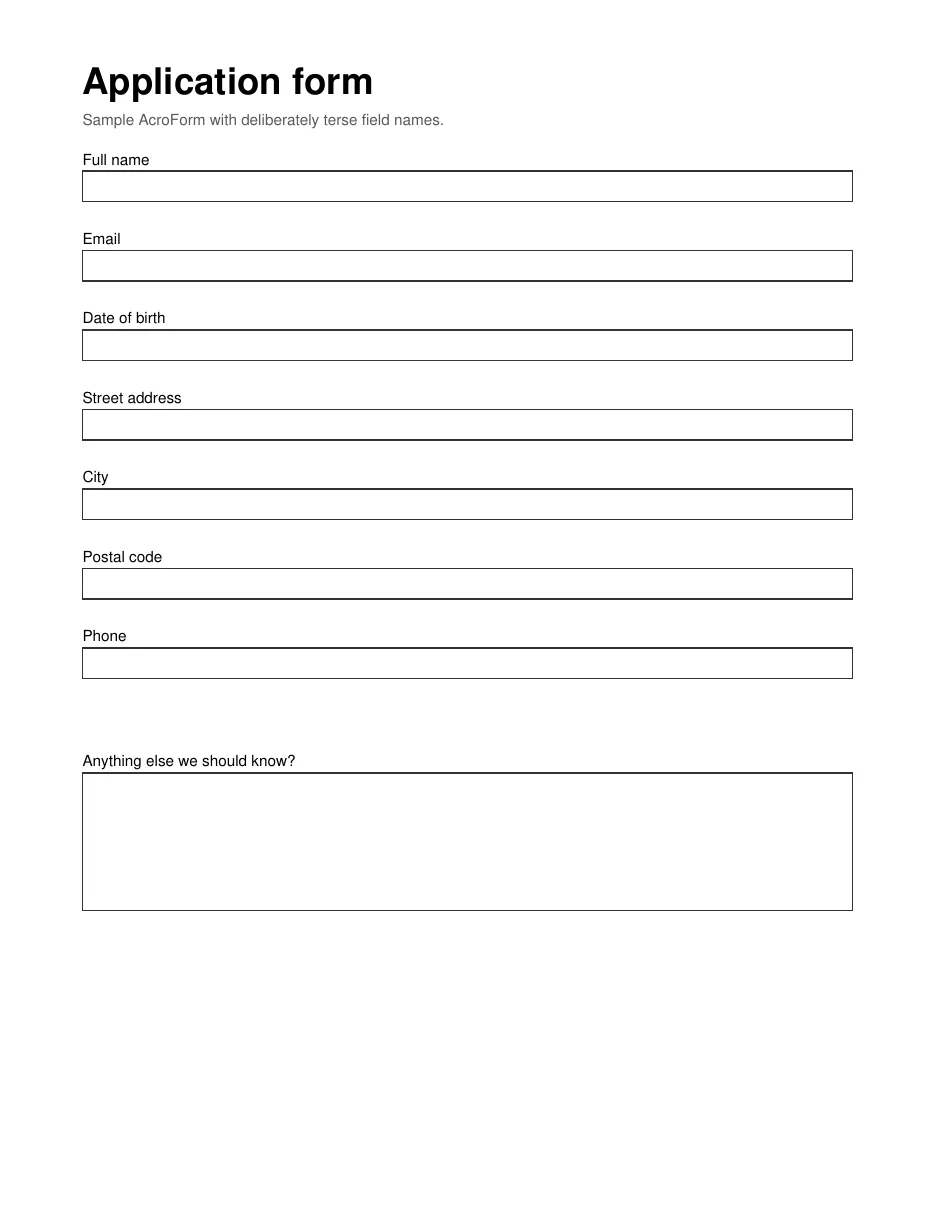
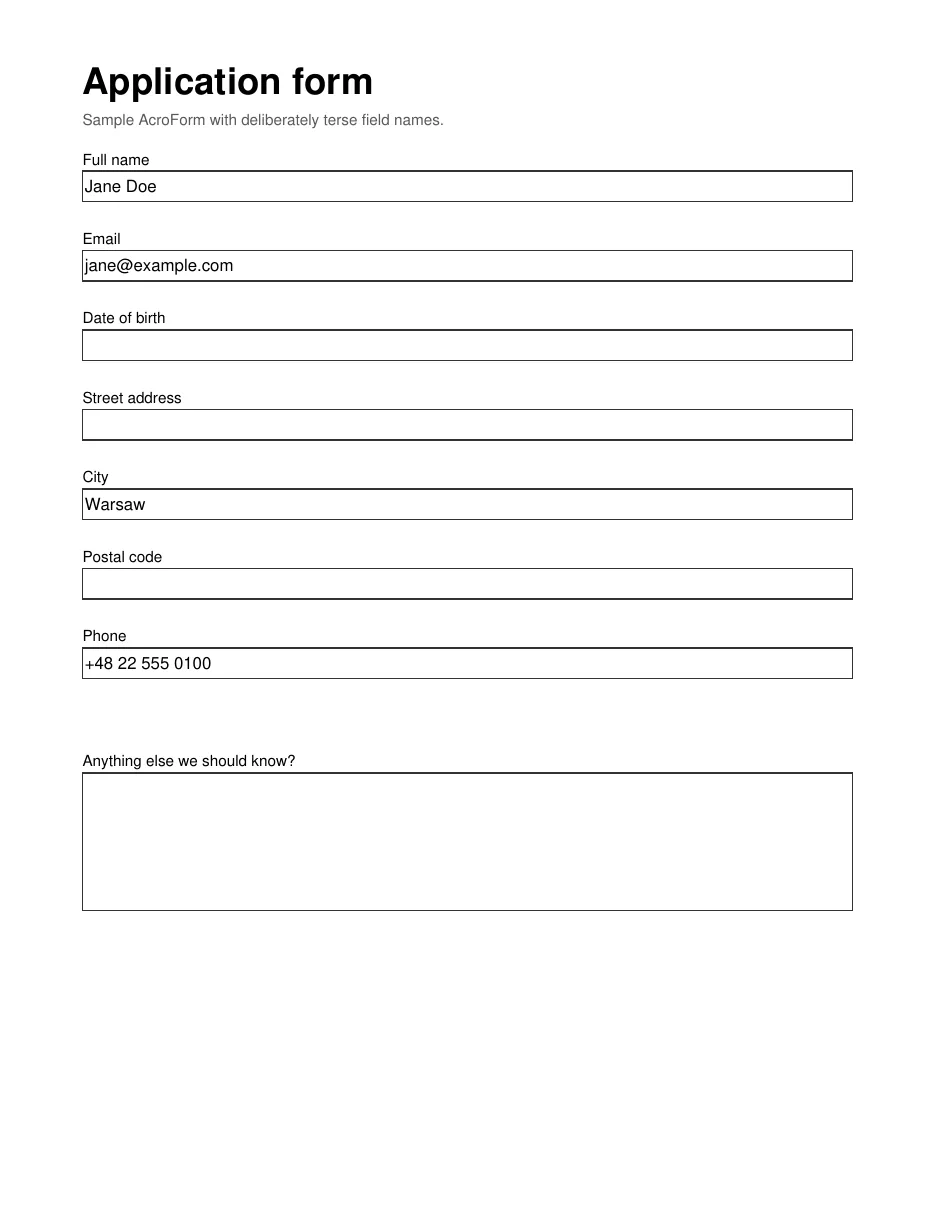
The blank form is public, so you can download the sample form and run the same scenario.
Watch the invoice scenario
Job 1: create an invoice PDF from a row of data
The scenario has two modules. The first holds the data. Here it is Tools, Set multiple variables, standing in for a row from a spreadsheet or database module, so the example needs no other account. The second is HTTP, Make a request.
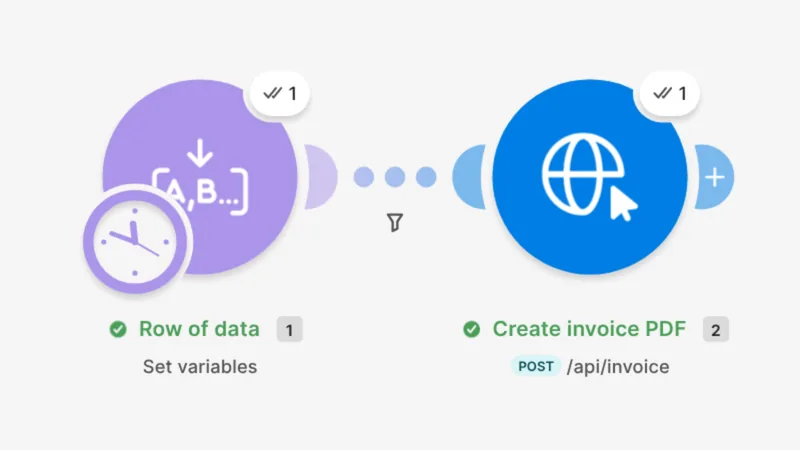
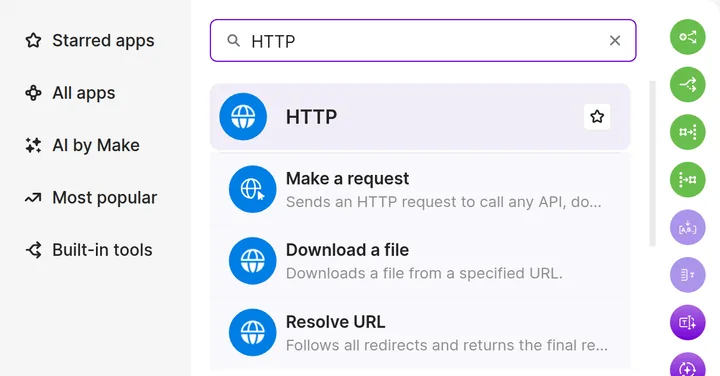
1. Add the HTTP module
Click the plus, search for HTTP and choose Make a request. Make's HTTP app also has Download a file, which Job 2 uses.
2. Save your API key in a connection
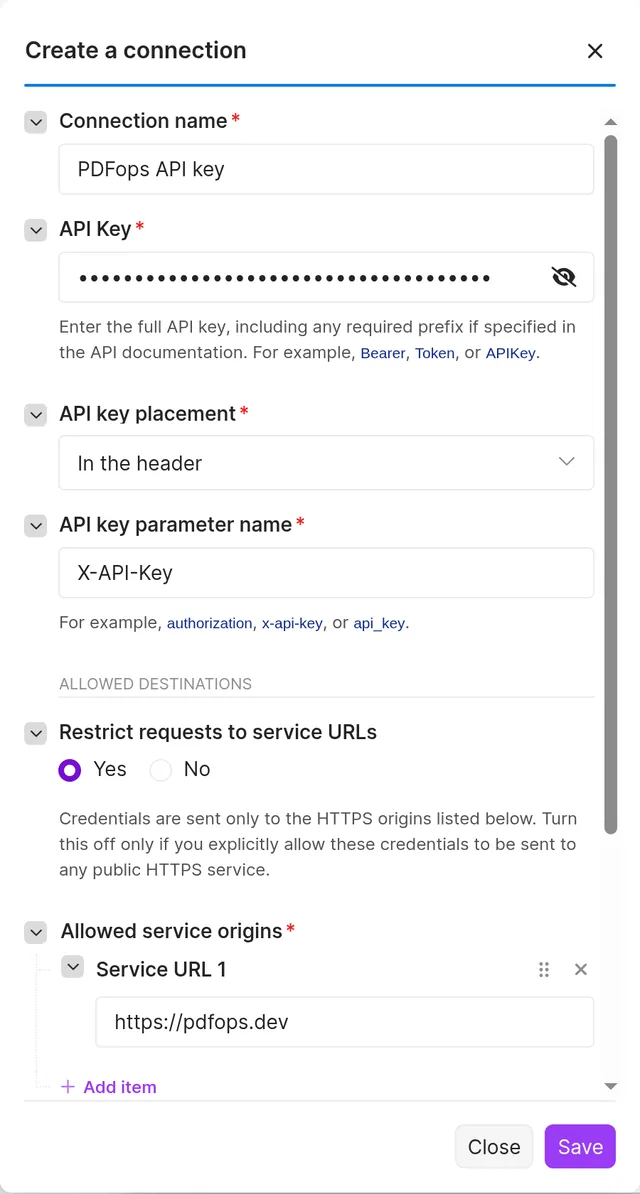
Set Authentication type to API key and click Add to create a connection. Get a free PDFops key (250 calls a month, no card) and paste it into the API Key field. Keep placement set to In the header, name the parameter X-API-Key, and restrict requests to https://pdfops.dev so the key is only ever sent to PDFops. The key is stored in the connection, so it does not appear in the module's settings, in the scenario or in its run log.
3. Point the module at the invoice endpoint
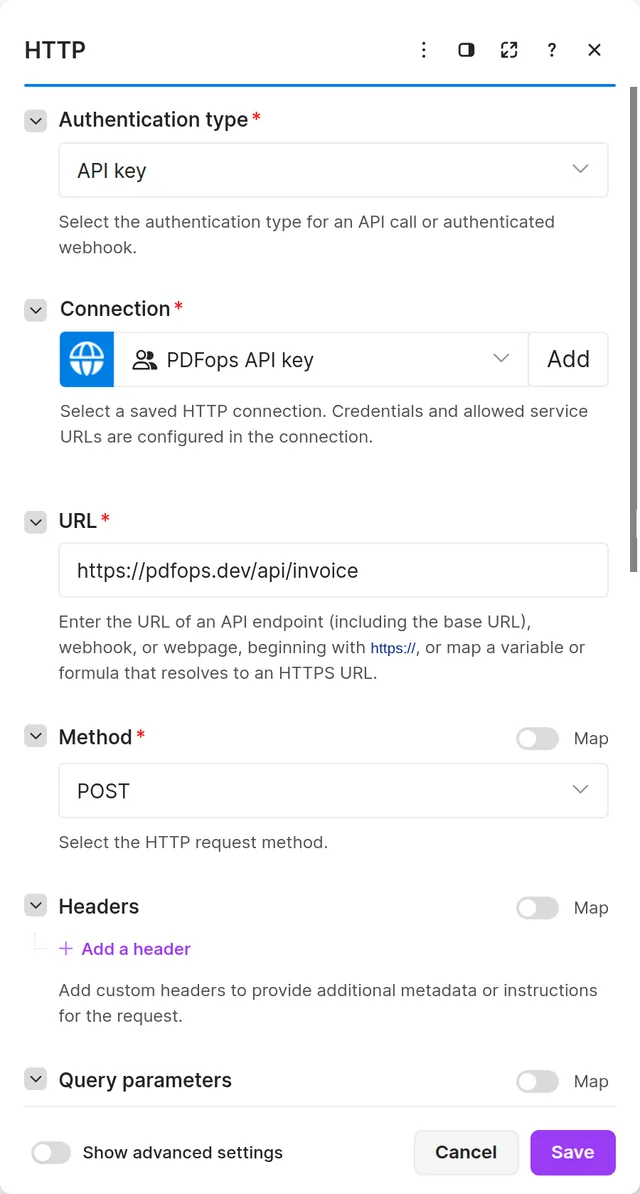
Pick the connection, set the URL to https://pdfops.dev/api/invoice and the method to POST.
Scroll down. Set Body content type to application/json and Body input method to JSON string, then type the body. Click a field in the row of data to drop its value in. Set Parse response to No, so the PDF stays a file instead of being read as text.
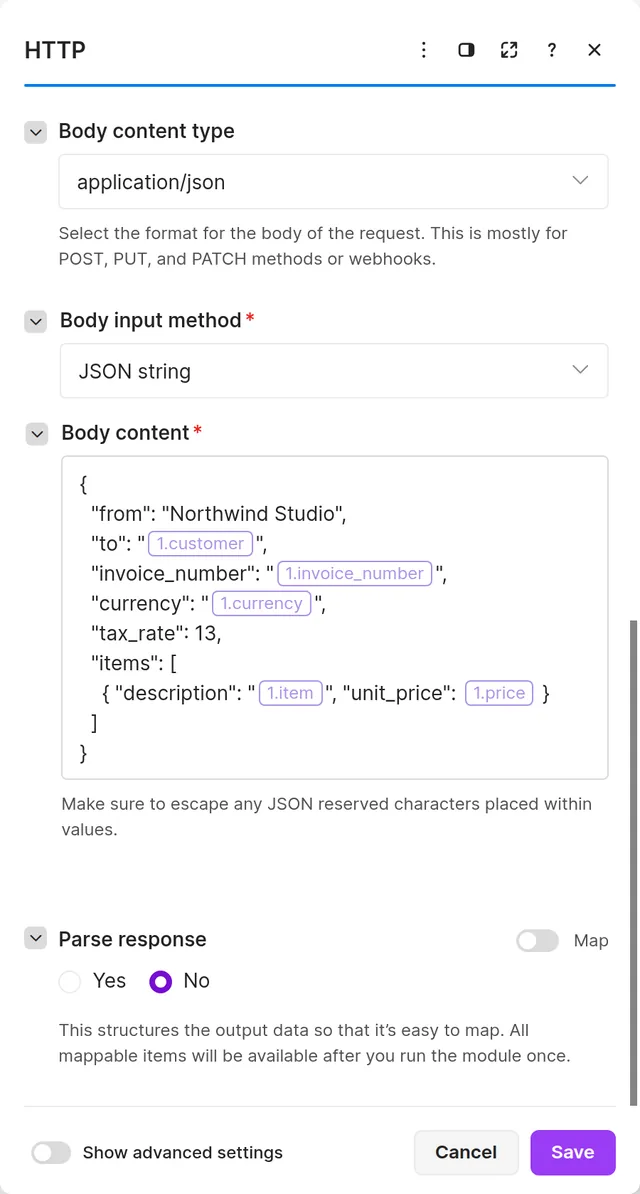
The body is plain JSON for the invoice endpoint. Each line item needs a description and a unit price.
4. Run once and read the result
Click Run once, then click the bubble above the HTTP module. A passing run shows statusCode: 200 and a data field that holds the PDF (it starts with the bytes for %PDF). Make also shows the file's size and a checksum.
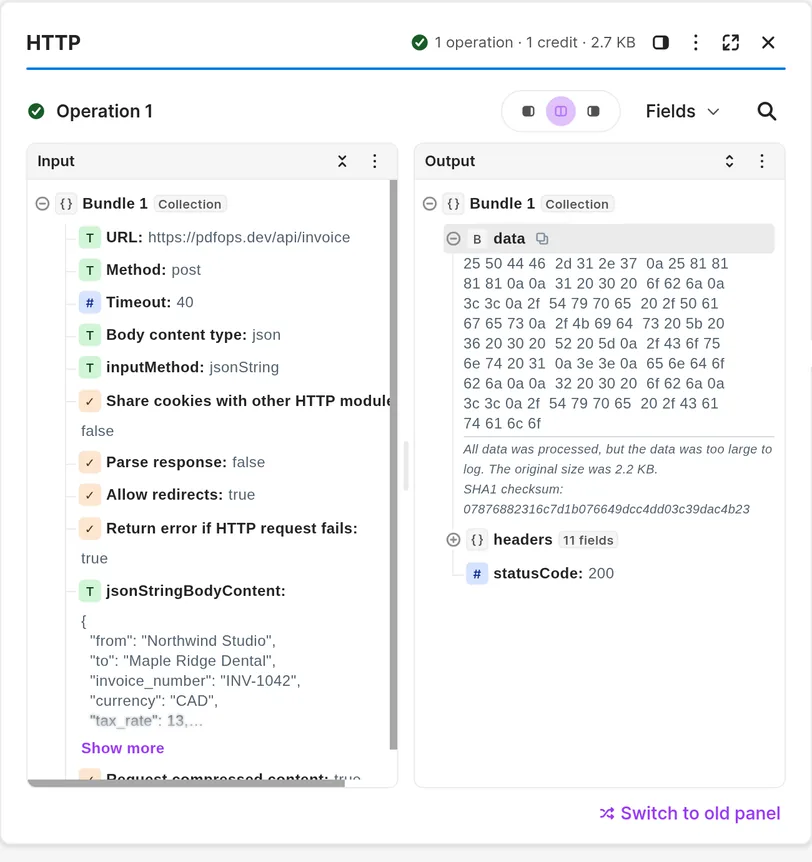
Pass data to any later module that takes a file, such as an upload or an email attachment, and replace the first module with the one that holds your real data. This guide does not cover those modules.
Job 2: fill a PDF form and save the file
This scenario has three modules: the values to fill in (again Set multiple variables as a stand-in), HTTP, Download a file to fetch the blank form, and HTTP, Make a request to fill it. The same connection from Job 1 is reused.
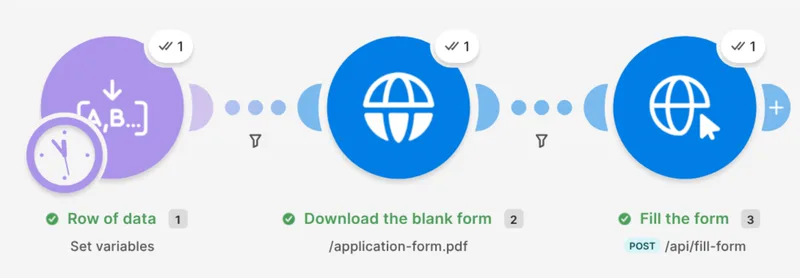
- Add HTTP, Download a file with the URL of your blank PDF. Here it is
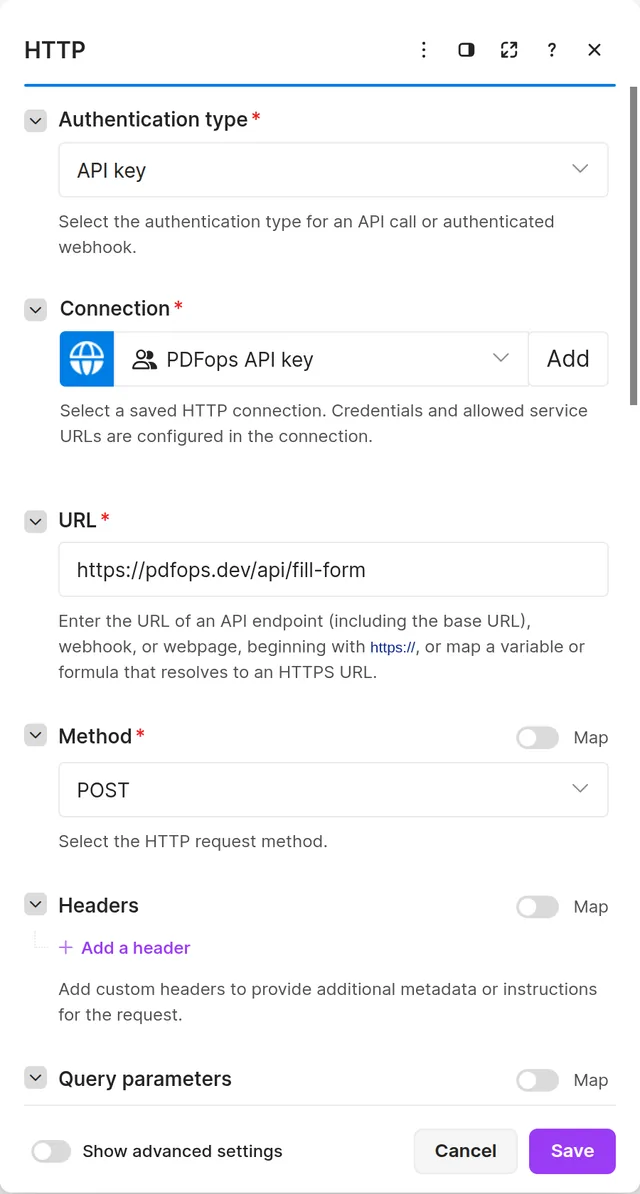
https://pdfops.dev/application-form.pdf. - Add HTTP, Make a request. Use the same connection, the URL
https://pdfops.dev/api/fill-formand the method POST. - Set Body content type to multipart/form-data and add three fields.
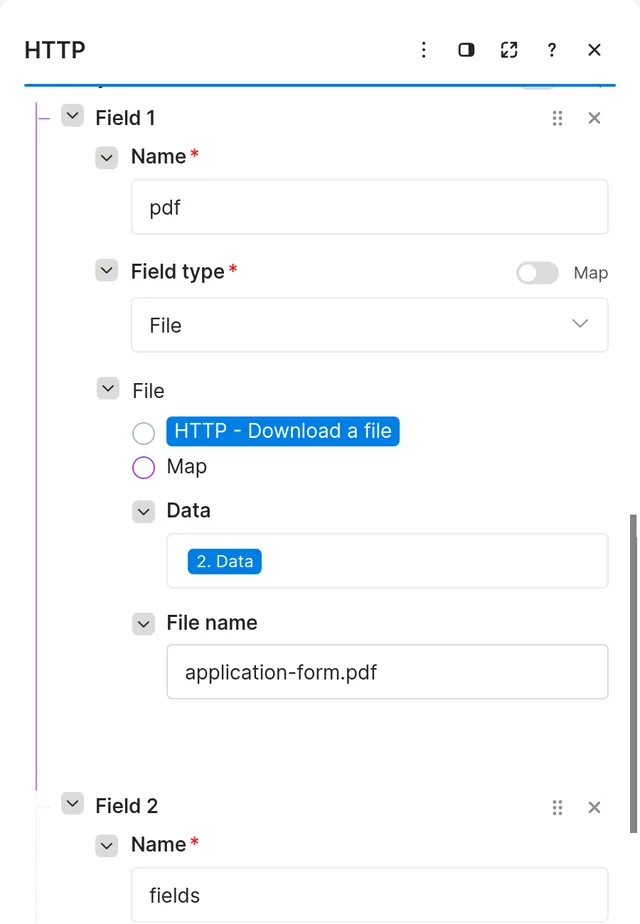
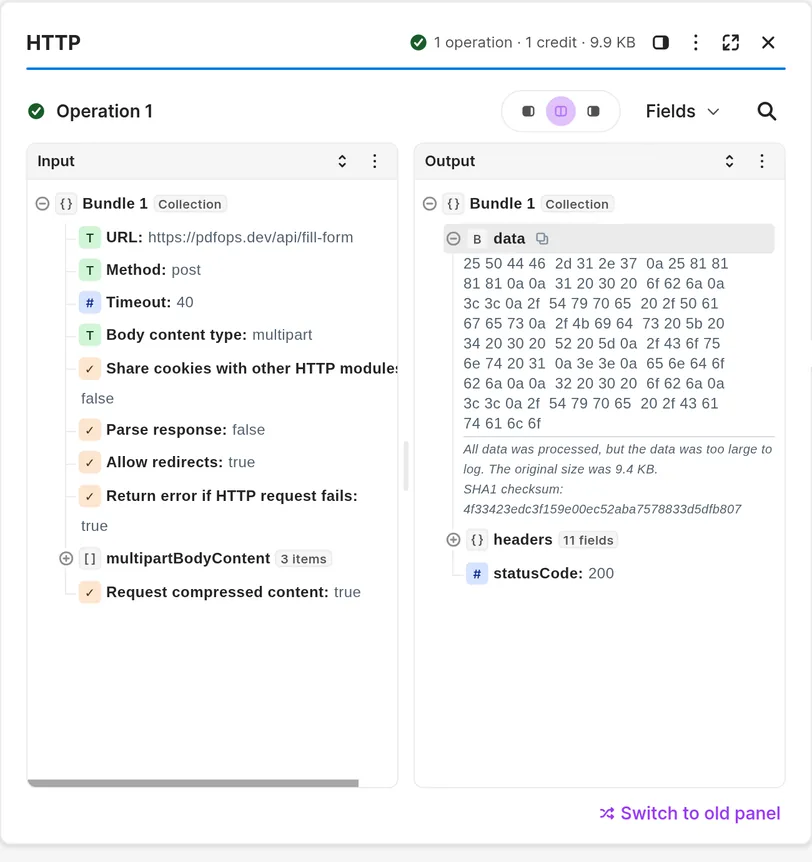
Field 1 is named pdf, with the type File. Map Data from the Download a file module and give it a file name. Field 2 is named fields, a Text field holding a JSON object of field names and values. Field 3 is named flatten with the value true, which bakes the values into the page so the result is not editable. Leave Flatten out if you want the fields to stay editable.
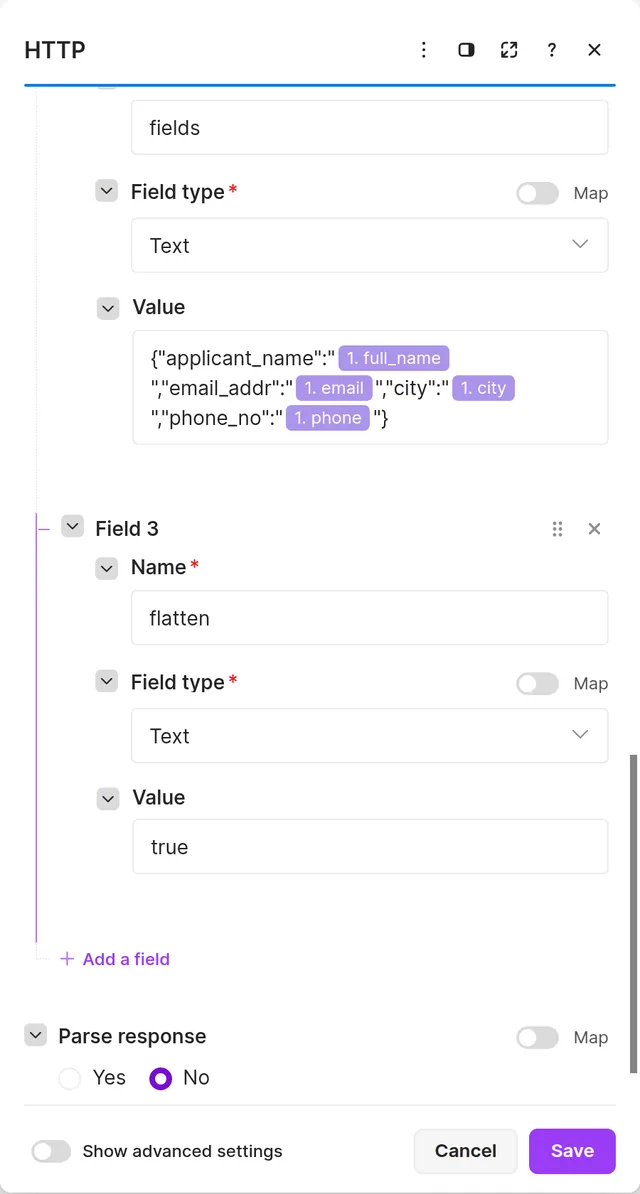
Field names are often not the labels printed on the page. The sample form prints "Full name" and "Email", but its fields are called applicant_name and email_addr. Find the real names by dropping the blank PDF into the free Form-Field Inspector. Checkboxes take true or false; dropdown and radio values must be one of the field's options.
Run once. As in Job 1, the HTTP module returns statusCode: 200 and the filled PDF as data.
What the native PDFops app will add
We have built a native PDFops app for Make. It is not listed yet, and we have not yet sent it to Make for review. Make reviews every public app before it appears in the app list, and we cannot say how long that takes, so keep using the HTTP module for now. The app is meant to replace the JSON and multipart typing above with ready-made fields and file pickers, and to keep the key in one connection. These are the modules it has:
| Module | What it does |
|---|---|
| Get a PDF form's fields | Returns a form's fillable fields with names, types and options. |
| Fill a PDF form | Fills the fields of a fillable PDF and returns the filled file. |
| Add fillable fields to a PDF | Adds text, checkbox, radio, dropdown and signature fields at exact positions. |
| Get PDF properties | Returns page count and sizes, title, author, dates and form information. |
| Extract text and tables from a PDF | Reads the text layer page by page, with lines, positions and tables. |
| Extract tables from a PDF to Excel | Returns the tables of a PDF as an Excel workbook, one sheet per table. |
| Find text in a PDF | Finds a word, phrase or pattern and returns each hit with its page and position. |
| Create an invoice PDF | Builds an invoice from sender, recipient and line items, with a Factur-X option. |
| Create a PDF from HTML | Renders an HTML string to PDF. JavaScript is off. |
| Create a PDF from text, Markdown or CSV | Lays out text, Markdown or CSV as a PDF. |
| Create a PDF from images | Makes one page per JPG or PNG image. |
| Merge PDFs | Joins two or more PDFs, in the order you list them. |
| List split PDF parts | Splits a PDF into parts and returns each part as its own file. |
| Extract pages from a PDF | Builds a new PDF from the pages you pick. |
| Delete pages from a PDF | Builds a new PDF without the pages you pick. |
| Rotate pages in a PDF | Rotates all pages, or the ones you pick. |
| Add page numbers to a PDF | Prints a page number on every page, or the pages you pick. |
| Stamp text or a barcode on a PDF | Stamps text, QR codes and barcodes at exact positions. |
| Add a watermark to a PDF | Adds a text watermark to all pages, or the ones you pick. |
| Attach files to a PDF | Embeds files, such as an XML invoice, inside a PDF. |
| Update PDF properties | Sets title, author, subject, keywords and creator. |
| Protect a PDF with a password | Encrypts a PDF so it needs a password to open. |
| Unlock a PDF | Removes print, copy and edit restrictions. It does not guess passwords. |
| Make an API call | Calls any PDFops endpoint that is not covered by another module. |
When the app is listed, this page will say so. Until then, everything above works as shown.
Limits and quotas
- No key: 100 requests per IP address per month. Use a key in Make.
- Free key: 250 requests a month, for an email address, no card. Larger plans are on the pricing page, which is the one place prices are kept.
- Request size: a request can be 4.5 MB in total and any one PDF can be 4 MB. For merge, the 4.5 MB covers all the files together.
- HTML to PDF costs five calls per render. Every other operation costs one.
- Make credits are separate. Each module that runs in a scenario uses Make credits, whatever PDFops charges.
Errors you may see
The HTTP module's Return error if HTTP request fails option is on by default, so a rejected call fails the run and Make shows the response.
| What you see | What it means | What to do |
|---|---|---|
invalid_api_key (HTTP 401) | The key is unknown, revoked or mistyped. Keys start with pdfops_live_. | Edit the connection and paste the key again. Get a free one if you need it. |
rate_limited (HTTP 429) | You have used all the calls your plan allows this calendar month (UTC). | Wait for the 1st of next month, or choose a larger plan on the pricing page. |
request_too_large (HTTP 413) or pdf_too_large | The request is over 4.5 MB, or one PDF is over 4 MB. | Use a smaller PDF. |
unknown_field (HTTP 400) | A name in the fields JSON does not match any field in the PDF. | Check the exact names with the Form-Field Inspector. The error text suggests close matches. |
Frequently asked
Is there a PDFops app in Make?
Not yet. PDFops works in Make today through Make's built-in HTTP module, as this guide shows. We have built a native PDFops app for Make, but it is not in Make's app list: it has to pass Make's review first, and we cannot say when that will happen.
Do I need an API key?
A free key is the better choice in Make. It is free: 250 calls a month for an email address, no card. Without a key, calls are limited to 100 per IP address per month, and the limit follows the address your request comes from rather than your account.
Does this work on Make's free plan?
Yes. Both scenarios in this guide were built and run on a free Make account. Each module that runs uses Make credits (the PDFops call in the screenshot used 1 credit), so check Make's own pricing for how many runs your plan covers.
Where does the PDF go after the run?
The HTTP module returns the PDF as a file in its data output. Pass that to any later module that accepts a file, such as a cloud storage upload or an email attachment. This guide stops at the run result and does not cover those modules.
Is PDFops a Make partner?
No. PDFops is an independent service and is not endorsed by Make. The Make sign-up link on this page is an affiliate link, which is disclosed next to it.
Try it in Make
Get a free PDFops key, then build the two-module scenario above. You can also test your own PDF in the playground first.
If you do not have a Make account yet, you can sign up for Make here. That is an affiliate link: if you later pay for a Make plan, PDFops may earn a commission from Make, at no extra cost to you. PDFops is an independent service, not a Make partner. See our privacy policy.
← PDFops home · Zapier guide · n8n guide · Free key · Pricing